

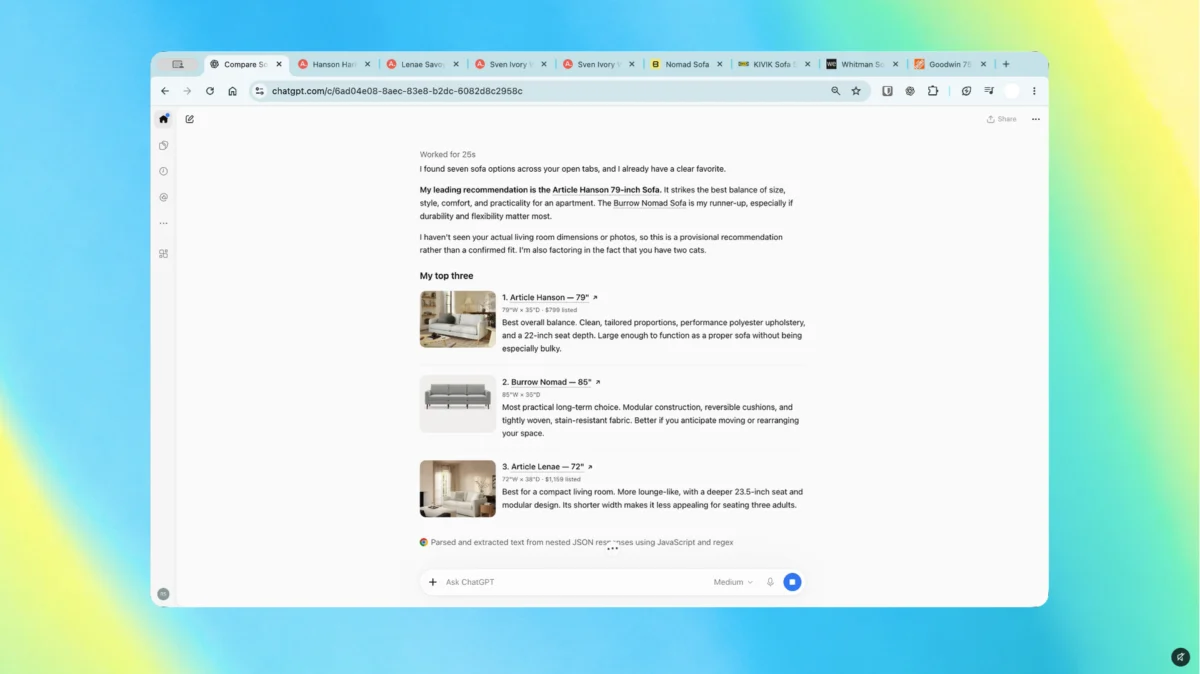
In a move that signals an escalation in the "AI browser wars," OpenAI has unveiled a significant upgrade to its ChatGPT Chrome extension. This update transforms the AI from a static chatbot residing in a separate tab into a dynamic, context-aware companion that lives directly inside the Google Chrome sidebar. By allowing ChatGPT to "see" and interact with the user’s browser environment, OpenAI is directly challenging Google’s efforts to make Gemini the native, default AI assistant for the world’s most popular web browser.
This integration represents a pivot in how users interact with large language models (LLMs). Rather than forcing users to toggle between their research and their AI assistant, OpenAI has effectively "broken the wall" between the browser’s content and the model’s reasoning capabilities.
The Evolution of the AI Assistant: From Tab to Tool
For years, the standard workflow for ChatGPT users involved a laborious process: highlighting text, copying it, switching tabs, pasting it into a chat box, waiting for a response, and then copying that back to the original document.
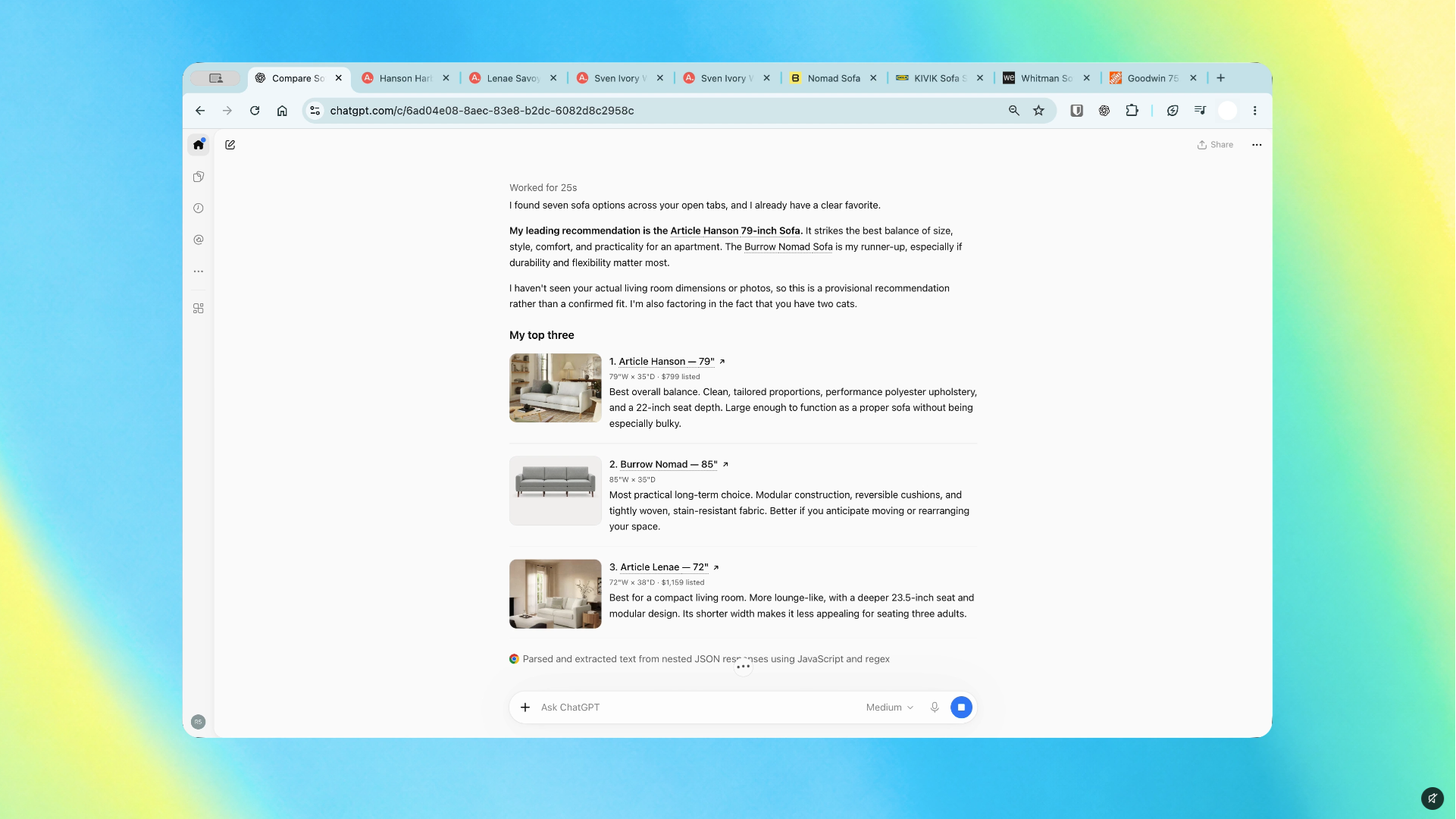
The new Chrome integration eliminates this friction. With the updated extension, users can keep a persistent sidebar open while they browse. More importantly, through the "ChatGPT Work" functionality, the AI can now access information across multiple open tabs. This means a user can ask the assistant to synthesize findings from four different research papers, compare price tags across six different e-commerce sites, or organize a cluttered workspace of dozens of open tabs.
This is not merely a convenience feature; it is an attempt to change the fundamental relationship between the user and the browser. By enabling the AI to act as a navigator that understands the user’s current intent, OpenAI is positioning ChatGPT as the primary interface through which we interact with the web.
A Chronology of Integration
The path to this moment has been paved with incremental updates aimed at increasing "agentic" behavior in AI:
- Early 2023: ChatGPT launches as a standalone web interface. Users rely on manual copy-pasting to move data between the browser and the AI.
- Late 2023: OpenAI releases basic browser extensions that allow for simple "summarize this page" features, but these tools remained limited to the specific tab the user was currently viewing.
- Mid 2024: The emergence of "Computer Use" capabilities. OpenAI begins testing models that can see the screen and click buttons, laying the groundwork for more advanced automation.
- October 2026: The current milestone. The updated Chrome extension is released, enabling multi-tab awareness and site-interaction capabilities (ChatGPT Work), allowing the AI to fill forms and handle complex tasks across the browser environment.
Supporting Data and User Experience
The appeal of this integration lies in the reduction of cognitive load. According to internal user testing reported by early adopters, the ability to query across tabs reduces the time spent on "information synthesis" by roughly 40%.
For researchers and power users, this is a transformative shift. Consider the scenario of a student writing a thesis: previously, they would need to manually aggregate data points from various sources. Now, they can command the sidebar to "compare the methodologies of these three open tabs and create a summary table."
However, this convenience comes with technical caveats. The integration’s effectiveness relies heavily on how a website is coded. If a site uses non-standard formatting or hides critical information behind dynamic JavaScript elements, the AI may struggle to "read" the page accurately. OpenAI has cautioned that while the tool is robust, it is not a replacement for human verification.
Official Responses and Strategic Positioning
OpenAI has remained relatively understated regarding the strategic implications, framing the update as a "productivity boost." A spokesperson noted, "Our goal is to meet users where they are. If our users are spending their day in Chrome, it makes sense for their assistant to be there with them."
Conversely, Google’s position is more defensive. With Gemini already deeply embedded into the Chrome architecture, Google has the advantage of native integration. Gemini can access browser history, bookmarks, and account data with fewer permissions hurdles than a third-party extension.
Industry analysts suggest that OpenAI’s move is a preemptive strike. By capturing the Chrome user base now, they hope to prevent Google from establishing a monopoly on AI-assisted browsing. If a user becomes accustomed to using the ChatGPT sidebar for their daily tasks, they are significantly less likely to switch to Gemini, even if the latter is "built-in."
The Implications: A New Battle for the Browser
The browser is currently the most important piece of software on any computer. It is the gateway to the internet, the workplace, and the primary vehicle for generative AI.
1. The Death of the "Single-Tab" Mindset
We are moving away from the "window" model of computing—where we look through a frame into a static world—to an "agentic" model. In this new world, the browser is an active participant in our tasks. When the AI can fill out forms, navigate through sub-menus, and group tabs on its own, the user becomes a manager of agents rather than a manual operator of software.
2. Privacy and Security Concerns
This level of integration brings significant security risks. By granting an AI extension access to "all open tabs," users are effectively handing over their browsing data to OpenAI. While the company has implemented granular permission controls, the potential for data leakage or accidental disclosure of sensitive information—such as internal company documents or private medical portals—is substantial. Users must now treat their AI extensions with the same level of scrutiny they apply to password managers or financial software.
3. The Future of Web Design
As AI agents become better at reading and interacting with websites, the way we build the internet may change. Developers may soon need to create "AI-friendly" layouts—structured data that makes it easier for agents to parse forms, identify checkout buttons, and scrape content. We could be looking at a future where the web is designed to be read by machines first, and humans second.
Navigating the Risks: A Balanced Approach
The ability to have an AI "fill out a form" is impressive, but it requires extreme vigilance. During early trials, the system showed a tendency to pause when it encountered ambiguous fields—a necessary safety feature. However, as these systems get faster, the risk of "automation bias"—the tendency to trust the machine’s output without checking it—becomes a genuine threat.
If an AI accidentally submits a form with incorrect information or interacts with a sensitive site in an unexpected way, the user is ultimately responsible. OpenAI’s reliance on user supervision is not just a legal shield; it is a critical safeguard against the hallucinations inherent in LLMs.
The Verdict: A Compelling Upgrade
Ultimately, the decision to install the new ChatGPT Chrome extension comes down to your personal workflow. If you are a casual user, the sidebar might feel like unnecessary clutter. But for the "power user"—the researcher, the student, or the professional juggling a dozen browser sessions—the integration is a game-changer.
The real winner in this scenario isn’t necessarily OpenAI or Google; it’s the user who learns to leverage these tools to reclaim their time. The internet has become an increasingly chaotic place, filled with fragmented information and endless distractions. By bringing a capable, context-aware AI directly into the browser, we are finally seeing the realization of the "intelligent assistant" we were promised decades ago.

As this technology matures, we can expect the competition to heat up further. We may see AI assistants that can not only read our tabs but also manage our calendars, compose emails in real-time, and negotiate purchases on our behalf. For now, the integration of ChatGPT into Chrome is the most significant step toward that autonomous future. Whether you choose to welcome the AI into your browser sidebar or prefer to keep your work and your chatbot separate, one thing is clear: the way we browse the web has changed forever.
