

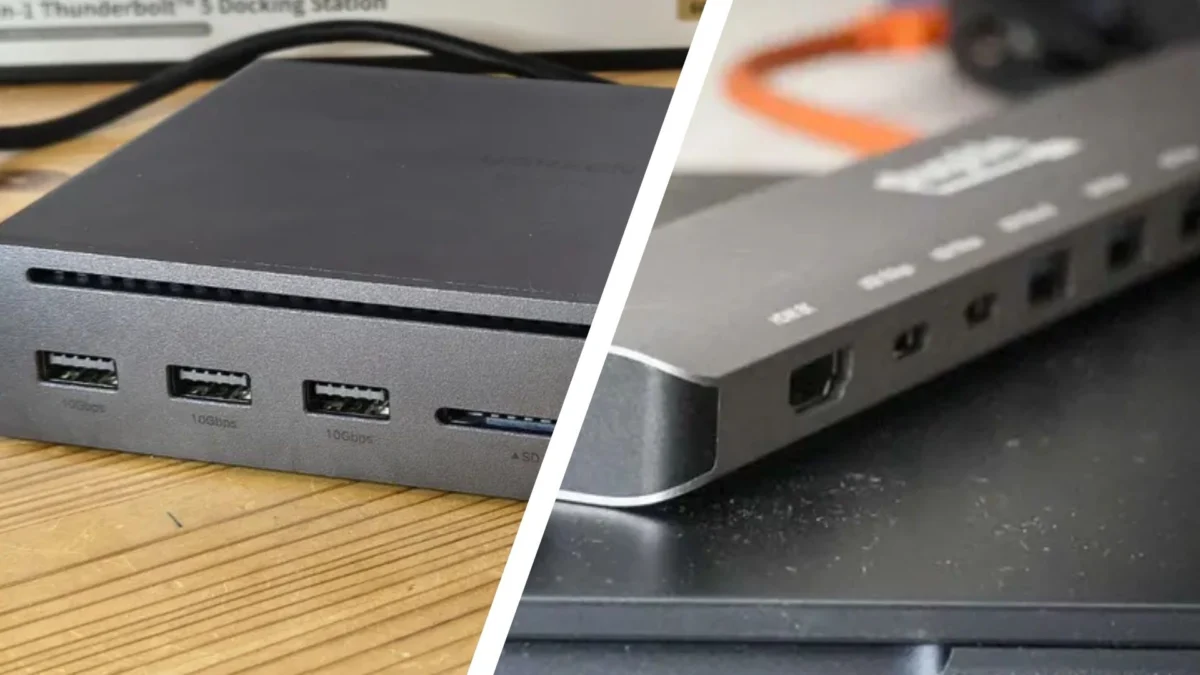
In the contemporary digital landscape, the modern workplace is increasingly defined by its flexibility. As laptops become thinner and more portable, manufacturers have systematically stripped away traditional ports, leaving users with a handful of USB-C slots. This design trend has catalyzed the rise of peripheral connectivity devices. While USB hubs and docking stations are often conflated, they represent two distinct tiers of hardware engineering. Understanding these differences is not merely a matter of technical interest; it is a fundamental requirement for anyone looking to optimize their personal or professional workflow.
Main Facts: Defining the Connectivity Divide
At their most basic level, both USB hubs and docking stations are designed to solve the "port scarcity" problem. However, their internal architecture and functional objectives differ significantly.
A USB hub acts primarily as a port multiplier. Much like an electrical power strip, it takes one input connection from your computer and splits it into multiple ports of the same or similar type. They are designed for portability, often requiring no external power source, as they draw the necessary voltage directly from the host laptop.
Conversely, a docking station is a comprehensive hardware interface designed to turn a mobile computer into a full-scale desktop workstation. These devices act as a bridge, housing their own dedicated power supplies, complex chipsets for signal processing, and an array of diverse input/output (I/O) ports—including HDMI, DisplayPort, Ethernet, and high-speed Thunderbolt interfaces.
Chronology: The Evolution of Peripheral Expansion
The trajectory of these devices follows the evolution of the laptop itself.
- The Early Era (1990s–2000s): Docking stations were proprietary, bulky plastic platforms that clicked into the underside of laptops. They were manufacturer-specific, meaning a Dell dock could not be used with a Lenovo machine. USB hubs existed as simple "port expanders" for desktop towers, rarely used for mobile setups.
- The Ultrabook Transition (2010s): As Apple’s MacBook Air and later the ultrabook category forced manufacturers to ditch VGA, Ethernet, and multiple USB-A ports, the demand for third-party expansion grew. USB hubs became slim, travel-friendly dongles.
- The Modern Unified Standard (Present): The universal adoption of USB-C and Thunderbolt 3/4 has bridged the gap. Modern docking stations are now "universal," using a single cable to handle data, high-resolution video, and power delivery (PD) simultaneously.
Supporting Data: Performance Benchmarks
When evaluating the two technologies, the gap in performance is measurable across four key pillars:
1. Data Transfer Speed
Docking stations are designed for high-throughput environments. While most standard USB hubs rely on USB 3.0 or 3.1 protocols, capping out at 5Gbps or 10Gbps, enterprise-grade docking stations—often utilizing Thunderbolt 4—can achieve speeds of up to 40Gbps. This is critical for professionals working with high-resolution video editing or massive database transfers.
2. Power Management
USB hubs are largely "passive" regarding power. While some "powered hubs" exist, they are primarily designed to keep the hub itself running rather than charging a laptop. Docking stations, however, serve as the primary power source for the computer. By utilizing USB-C Power Delivery (PD), a single docking station can provide 65W, 100W, or even higher wattage to a laptop, eliminating the need to carry a separate power brick.
3. Display Capabilities
The limitations of USB hubs become apparent when connecting external monitors. Most USB hubs are limited by the bandwidth of the host port, usually supporting only one or two displays at 4K resolution at 30Hz or 60Hz. Docking stations utilize dedicated display controllers, enabling multi-monitor setups (up to three external screens) at higher resolutions, including 8K, without straining the host computer’s CPU or integrated graphics.
4. Port Diversity
- USB Hubs: Focus on USB-A and USB-C connectivity.
- Docking Stations: Include legacy support (Ethernet for stable wired internet, 3.5mm audio jacks, SD card readers, and dedicated display outputs like DisplayPort).
Official Perspectives and Professional Use Cases
Industry leaders in hardware manufacturing, such as CalDigit, Anker, and Kensington, often distinguish their product lines based on the target demographic.
For the Mobile Professional: The industry consensus suggests that those who spend more than 50% of their time traveling should prioritize a high-quality USB-C hub. The weight reduction and the ability to operate solely on the laptop’s battery make these devices indispensable for the "nomad" worker.
For the Enterprise/Home Office: Official white papers from corporate IT departments highlight the necessity of docking stations for long-term health and productivity. The ergonomic advantage of having a single-cable "plug-and-play" experience for monitors, keyboards, mice, and wired internet is cited as a major factor in reducing employee downtime and desk clutter.
Implications for Your Workflow
The decision between a hub and a dock ultimately rests on the "Stationarity Index" of your workspace.
When to choose a USB Hub:
- Cost Sensitivity: You have a budget of $30–$80.
- High Mobility: You work from cafes, airports, and client sites.
- Light Requirements: You only need to connect a mouse, a keyboard, and perhaps one external drive or a single monitor.
- Occasional Use: You rarely need to connect more than three peripherals at once.
When to choose a Docking Station:
- Desktop Replacement: You want your laptop to function as a powerful desktop workstation.
- Heavy Workloads: You are a video editor, data scientist, or designer requiring high-speed data transfer and multiple 4K/8K displays.
- Ergonomics: You want a clean, "one-cable" solution where your power and all peripherals are managed by one device permanently fixed to your desk.
- Infrastructure: You require a stable, wired Ethernet connection for professional-grade network security and speed.
Final Verdict: The Strategic Investment
In the final analysis, the choice is not about which device is "better," but which is more appropriate for your operational needs. A docking station is a strategic investment—a piece of infrastructure that transforms your computer environment. It is a long-term commitment, reflected in its higher price point (typically $150 to $400+) and its heavier, non-portable design.
A USB hub is a tactical accessory—a temporary, lightweight solution designed to overcome immediate inconveniences. It provides the necessary extra ports to bridge the gap during travel or light office tasks but lacks the muscle required for a high-performance workstation.
As the lines between desktop computing and mobile computing continue to blur, the hardware we choose to connect our devices will remain the unsung heroes of our productivity. Whether you opt for the portability of a sleek hub or the industrial-grade power of a docking station, understanding the limitations and strengths of each will ensure that your technology serves your workflow, rather than hindering it. For those looking to upgrade, consider the long-term cost of connectivity; investing in a high-quality docking station today may prevent the need for multiple, less-reliable hubs tomorrow.
