

In the rapidly evolving landscape of computer peripherals, innovation often treads the line between visionary utility and absolute absurdity. For decades, the standard computer mouse has remained a remarkably static tool: two buttons, a scroll wheel, and an optical sensor. While gaming mice have introduced programmable side buttons and ergonomic contouring, the fundamental interaction model has stayed the same. Enter Arctic Fox Technologies, a startup that has decided to challenge the status quo by introducing the "Super Mouse"—a device that attempts to merge a high-fidelity touchscreen, a full QWERTY keyboard, and motion-sensing gestural controls into a single, palm-sized chassis.
Currently seeking funding on Kickstarter, the Super Mouse is arguably the most ambitious, and perhaps the most confounding, piece of hardware to hit the peripheral market in years. With an early-bird price of $199 and a projected retail cost of $249, it positions itself firmly in the premium productivity category. But is it a breakthrough in human-computer interaction, or is it a solution looking for a problem that doesn’t exist?
Main Facts: A Command Center Under Your Palm
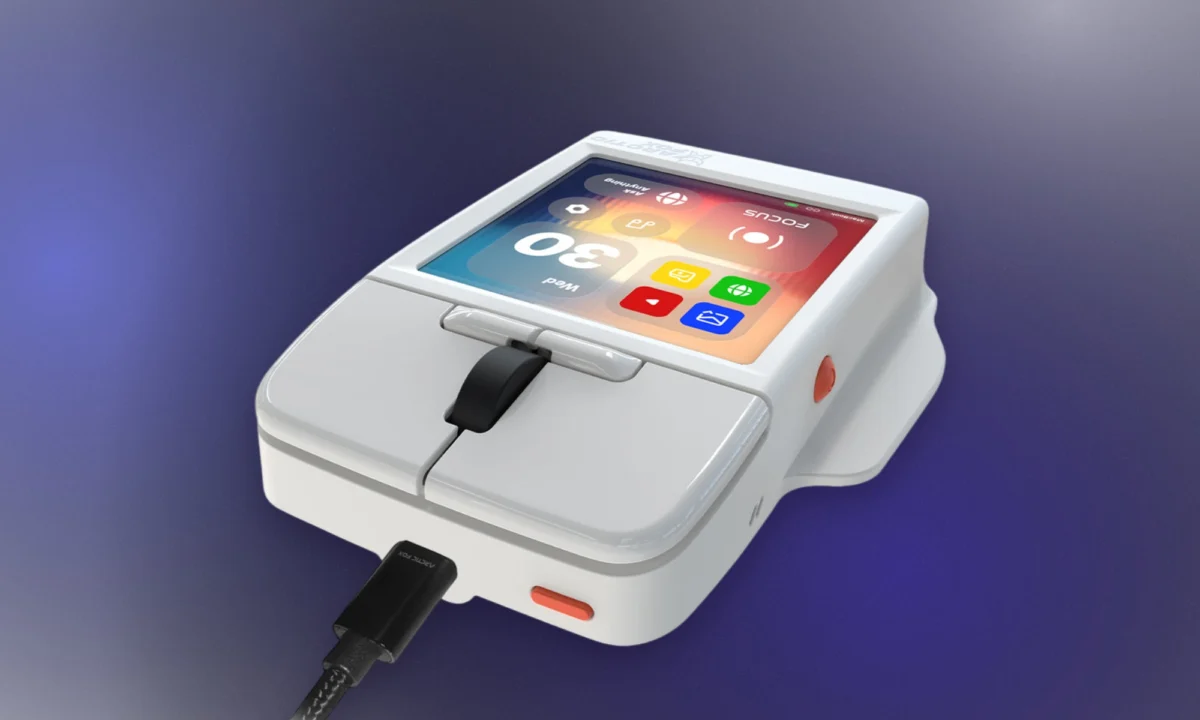
At its core, the Super Mouse is a 3.1-inch, 720 x 720 resolution touchscreen display mounted directly onto the top of the mouse body. While Turtle Beach’s Command Series MC7 flirted with the idea of a control display, the Super Mouse goes several steps further. The screen is designed to function as a dynamic input surface. Depending on the software currently in focus—be it Adobe Photoshop, Figma, or a simple web browser—the display reconfigures its UI to provide context-aware shortcuts.

Beyond the screen, the device boasts an integrated on-screen keyboard that supports swipe typing. For power users who find themselves switching between apps, the mouse aims to eliminate the need for complex keyboard macros by putting the controls literally at their fingertips. Furthermore, the device includes:
- Voice Dictation: Localized processing for over 90 languages, ensuring privacy and speed.
- Motion Controls: Built-in gyroscopic sensors allow for "tilt-to-scroll" or "twist-to-zoom" functionality.
- Hyper Keys: Physical buttons that complement the digital interface for haptic feedback.
- Flow App Integration: A proprietary software suite for Windows and macOS that manages the customization of these workflows.
A Chronology of the “Super” Concept
The journey toward the Super Mouse didn’t happen in a vacuum. The concept of the "smart mouse" has been bubbling in the R&D labs of various companies for years, fueled by a desire to shorten the distance between thought and execution.
- Early 2020s: Experimental prototypes from various Chinese OEMs began surfacing with small OLED strips, primarily aimed at displaying system metrics (CPU/RAM usage).
- 2025: Turtle Beach launched the MC7, which utilized a 2.25-inch screen for basic control, signaling a shift toward mainstream adoption of secondary displays on input devices.
- October 2026: Arctic Fox Technologies officially unveiled the Super Mouse on Kickstarter. The project gained immediate traction among early adopters and tech enthusiasts, reaching its initial funding goals within the first 72 hours.
- Q1 2027 (Projected): Arctic Fox expects to begin shipping the first units to Kickstarter backers, a timeline that relies heavily on the finalization of the Flow software app.
Supporting Data: The Productivity Equation
The primary argument in favor of the Super Mouse is the reduction of "context switching." Studies in human-computer interaction have long suggested that the time lost by moving a hand from a mouse to a keyboard—and back again—can accumulate to significant downtime over the course of a professional workday.

According to Arctic Fox, the average creative professional performs hundreds of repetitive tasks daily. By using the Super Mouse’s screen to trigger these actions, the company claims a productivity gain of up to 30% in software environments like Adobe Creative Cloud. However, these figures remain speculative. Detractors point out that the physical act of looking down at one’s hand to tap a touchscreen can actually disrupt the "flow state" more than a familiar keyboard shortcut would.
From a hardware standpoint, the device’s weight and dimensions are of particular interest. At its current prototype stage, it features a boxy, somewhat industrial aesthetic reminiscent of 1980s computing peripherals. Arctic Fox defends this choice, noting that the bulk is necessary to house the display circuitry and battery while maintaining an ergonomic profile that prevents the user’s palm from inadvertently triggering the touchscreen.
Official Responses and Developer Philosophy
In interviews following the launch, representatives from Arctic Fox Technologies have emphasized that the Super Mouse is not intended to replace the keyboard, but to "augment" it.

"We are looking at the mouse as the final frontier of the desktop," stated an Arctic Fox spokesperson. "We spend all day with our hands on these devices, yet they have been limited to basic tracking and clicking. By turning the mouse into a dynamic input surface, we are effectively giving the user a third hand."
When questioned about the decision to use a USB-C wired connection instead of wireless, the company cited the high data throughput requirements of the touchscreen and the latency concerns inherent in current wireless transmission standards. For a device that relies on real-time haptic feedback and instant shortcut execution, wired stability was deemed the superior design choice.
Implications for the Peripheral Market
The arrival of the Super Mouse raises significant questions about the future of office hardware. If successful, it could trigger a trend where every major peripheral manufacturer begins integrating secondary displays into their mice. This would move the industry toward a "modular desktop" philosophy, where users customize their physical input devices as heavily as they customize their software environments.

However, there are valid concerns regarding ergonomics. Long-term use of a device that requires constant wrist and finger adjustment for screen interaction could potentially increase the risk of repetitive strain injuries (RSI). Furthermore, the reliance on a proprietary "Flow" app poses a risk of software obsolescence; if Arctic Fox fails to support the software long-term, the device effectively loses its "super" capabilities and becomes a very expensive, bulky, wired mouse.
The Verdict on Utility
The Super Mouse is undeniably a fascinating piece of engineering. Whether it is a "must-have" tool depends entirely on the user’s workflow. For a video editor who needs to scrub a timeline while simultaneously toggling color grading presets, the device could be a game-changer. For a general office worker, it may be an unnecessary complication that adds clutter to the desk and friction to the workflow.
As the Kickstarter campaign moves toward its conclusion, the tech community remains divided. On one side are the dreamers who believe that the mouse has been stagnant for too long and that innovation, even if it looks a bit "absurd," is necessary. On the other are the pragmatists who value the tried-and-true simplicity of standard peripherals.

Regardless of its ultimate success or failure, the Super Mouse has succeeded in forcing a conversation about the limitations of our current input devices. In an era where software is becoming increasingly complex, it is only natural that we begin to demand more from the hardware we use to navigate it. Whether that "more" looks like a touchscreen on a mouse or something entirely different remains to be seen. For now, the Arctic Fox Super Mouse stands as a bold, if eccentric, experiment in the future of the desk.
